

Welcome to Sharkly
Claude Code, Codex, and tools like them are already fast for one person. You give them a request, and they read the code, edit files, run tests, and work through failures until the change is done.
That breaks down as soon as more than one person is involved.
The request still lives in Jira, Slack, a doc, a comment, or a screenshot. Someone pastes it into a terminal, then pastes the progress, the blocker, and the result back into the tracker. With several terminals open, the board never shows which Agent is doing what. If two of them edit the same directory, they overwrite each other. A workflow one person has tuned stays on their machine, so the rest of the team cannot reuse it.
Individual work is already AI native. The team's is not. Coordination is still the tracker.
Sharkly is for progressive AI native work. Keep the process the team already runs. Give an Agent one step of it, and leave the rest as it is. When that step is reliable, give it another. You do not need to assign every Task to an Agent on the first day, and you do not need to replace the tools the team already uses to coordinate.
Sharkly is not another coding agent. It does not replace Claude Code, Codex, or Cursor. Those tools still write the code, and you still pay for them through the Coding Plan or API key you already have.
The Quickstart is the smallest version of this: one small Task, one Agent, and nothing else changed.
Keep the process you already have
Sharkly connects to Jira. Import the Tasks you already have, or keep them in sync. Requirements, statuses, and the process between people stay where they are. Agent execution is added on top. Notifications can stay in Slack, where the team already talks.
Product, engineering, and QA still work from the same board. A Task is a requirement, a bug, or a piece of work. It has a title, a description, a priority, a status, Assignees, and a history. Constraints, screenshots, and acceptance criteria added later stay on it. A person is still responsible for moving it forward. Work that needs a judgment, a split, or a decision across teams stays with people.
Discussion stays on the Task, not in private chats. Proposals, review, and acceptance are comments. @ the people who need to see them, and mark a thread resolved. The next person who opens the Task can see why it was decided that way.
Work larger than one Task is grouped with Projects and Sprints. A Project collects related Tasks under one goal, so you can see how far that effort has moved. A Sprint puts this round of delivery in one time window: what is in scope, what is done, and what is still open.
A View lays those Tasks out by status. You can see who is on what, which column is stuck, and which Tasks are waiting for review. Save a filter you use often, such as "reviews this week" or "my open Tasks". Standup and assignment happen on that board.
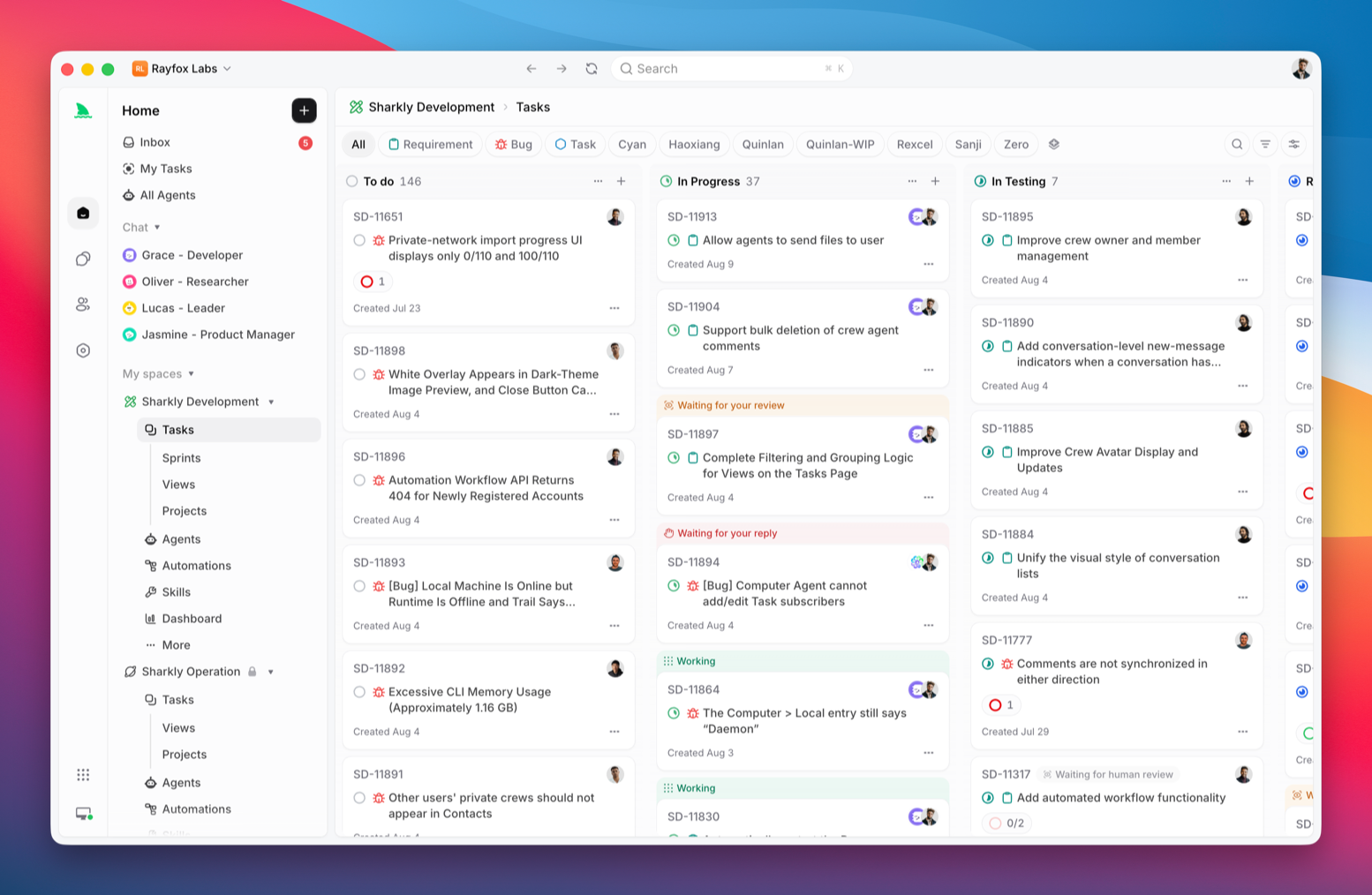
Give an Agent one step
A Task can be given to an Agent to run. Set the Agent as the execution Assignee, the same way you would assign a teammate. It works from that Task: it changes the code and runs checks, and leaves a diff you can review. For research, a summary, or a test, it writes the report back on the Task. You do not paste the request into a terminal and carry the result back.
The Agent reads the Task, the instructions it should follow, and the discussion already on it. It can commit when the work is done. A person still accepts the result. Progress and blockers are written back to the same Task. Anything that needs you shows up in Inbox.
Several Tasks can run at once. Each one gets its own worktree, so they do not overwrite each other. Someone still reviews the change before it is merged.
When that works, give it more
Keep one person's setup for the team
People do not use Claude Code or Codex the same way. One person reads the request before touching code. Another wants a plan first. Another always runs the same tests. Another has a stack of prompts, scripts, and project conventions. If that stays in one terminal, the next person with the same kind of Task has to learn it again.
Put those habits in an Agent: what it owns, what to check before it acts, which checks to run after a change, and how to report when it is done. Anyone on the board can then assign that kind of Task to it. If someone has tuned how the team fixes flaky frontend tests, the next person with that bug assigns the Task to that Agent.
A procedure that comes up often, and that more than one Agent needs, can be saved as a Skill and attached to the Agents that need it. A goal that belongs to one Task stays on the Task, not in the Agent.
When one Task needs several people and Agents, use a Crew
Not every Task should be done by one Agent from start to finish. A larger request is usually split: understand the goal, read the code, decide the approach, implement it, add tests, review, and bring the result back.
That kind of Task can go to a Crew. A Crew has a lead Agent. Members can be other Agents or people. The lead decides how to split the Task, assigns one step to the right member, and the result still comes back to the same Task. That is the same split the team already uses. One Agent does not take the whole thing. People and Agents each do the step they own.
Stop relying on someone to remember
Standup notes, weekly summaries, bug triage, and filling in a request used to depend on a reminder, a process rule, or one person walking the board. Once the team is used to giving one kind of Task to an Agent, those repeated steps can be an Automation.
An Automation is a rule: when it runs, who it goes to, and what it does. An Agent can summarize blocked Tasks each morning, or Project progress each week. Entering a status can start a first pass. A phrase in a comment can start a fixed procedure. A webhook from GitHub or CI can create or update a Task. Failing tests, Tasks nobody has touched, and Tasks with no Assignee can be checked on a schedule. The rule decides who gets the work: a person, or an Agent.
Where teams use it
Product development
A request passes through a lot of people between the first note, the research, the split into Tasks, parallel implementation, and acceptance. If the context is scattered across chat and private terminals, the next person has to ask again.
Sharkly keeps that path on one board. The request is a Task. An Agent does the research and fills in the context. A person confirms the scope and the acceptance criteria. The work is then split and run in parallel, and a person accepts the result. Projects and Sprints show how far this round has gotten. See Tasks, Projects, and Sprints.
Keeping up with testing
Changes ship often. If every check is still done by hand, testing falls behind.
Split the work across Agents. One reads the code and checks whether a change is ready to test. Another turns the request into cases. Another runs the checks. The people who test decide what runs, confirm anything uncertain, and accept the result. See Agent task execution and Automations.
Requests that start in chat
A lot of work starts as one message: an error screenshot, a short discussion, and a conclusion that stays in the channel. A few days later, finding the status means scrolling back through chat.
Connect Slack. Mention a Sharkly Agent in the thread and it can turn that discussion into a Task, with the screenshot and the conclusion already attached, then hand it to a person or another Agent. Progress can be posted back to the thread.
Docs that lag behind the release
A feature is already live, and the help page or the changelog still describes the old behavior. Someone has to remember to look through the Tasks that shipped.
An Agent can check shipped Tasks on a schedule and draft what should change. A person reviews that plan. A docs Agent can then edit, commit, and open a preview. The person decides whether it should be written, and how. The Agent finds the change and makes the edit. See Automations.
Getting started
- Connect a Computer. The Agent uses the coding tools already installed on it. A local computer or a cloud server both work.
- Create one Agent. Give it one kind of work, such as bug fixes, and say what it may do and how it should report.
- Assign one small Task. Set that Agent as the execution Assignee. The run, the blockers, and the result come back on that Task.
Run that step first and leave the rest of the workflow as it is. When it works, decide whether more of it should go to an Agent. The clicks are in the Quickstart.